
Introduction: The New Era of Data Privacy in Indian Legal Practice
The Digital Personal Data Protection (DPDP) Act, 2023, has fundamentally transformed how Indian law firms handle client information. With the DPDP Rules, 2025 officially notified in November 2025, full enforcement is now a reality for legal practitioners across India. Therefore, configuring your LawSathi security settings properly isn’t just a technical task anymore. It’s a legal necessity.
Why Data Privacy Matters for Indian Lawyers
Lawyers have always borne a dual obligation when protecting client information. First, there’s the ethical duty of confidentiality codified under the Bharatiya Sakshya Adhiniyam, 2023. Second, there’s now a statutory duty under the DPDP Act. This duty carries substantial financial penalties for non-compliance.
The Supreme Court’s landmark judgment in Justice K.S. Puttaswamy v. Union of India established privacy as a fundamental right. Consequently, this constitutional foundation directly impacts how legal professionals must manage digital data. As a result, law firms that fail to implement adequate safeguards face serious consequences. These include professional misconduct charges and penalties reaching up to ₹250 crore.
LawSathi: Your Compliance-Ready Partner
LawSathi addresses these challenges head-on with built-in compliance features designed specifically for Indian law firms. Specifically, the platform’s security settings align with the seven core principles of the DPDP Act. These include consent management, purpose limitation, data minimization, and accountability mechanisms.
This guide walks you through configuring each security setting systematically. By the end, your practice will be ready to demonstrate compliance to regulators and clients alike.
Understanding Your Role as a ‘Data Fiduciary’ Under the DPDP Act
Before diving into configuration steps, you must understand your legal position. According to Bar & Bench’s analysis of the DPDP Act, a Data Fiduciary is any entity that determines the purpose and means of processing personal data.
What This Means for Your Law Firm
Every Indian law firm qualifies as a Data Fiduciary. When you collect client names, contact details, case information, or financial records, you’re processing personal data. Therefore, you bear full responsibility for how that data is handled, stored, and protected.
The official DPDP Rules notification clarifies a critical point. Even data collected offline and subsequently digitized falls within the Act’s scope. In other words, your existing client files become subject to DPDP regulations once uploaded to LawSathi.
Key Obligations You Must Fulfill
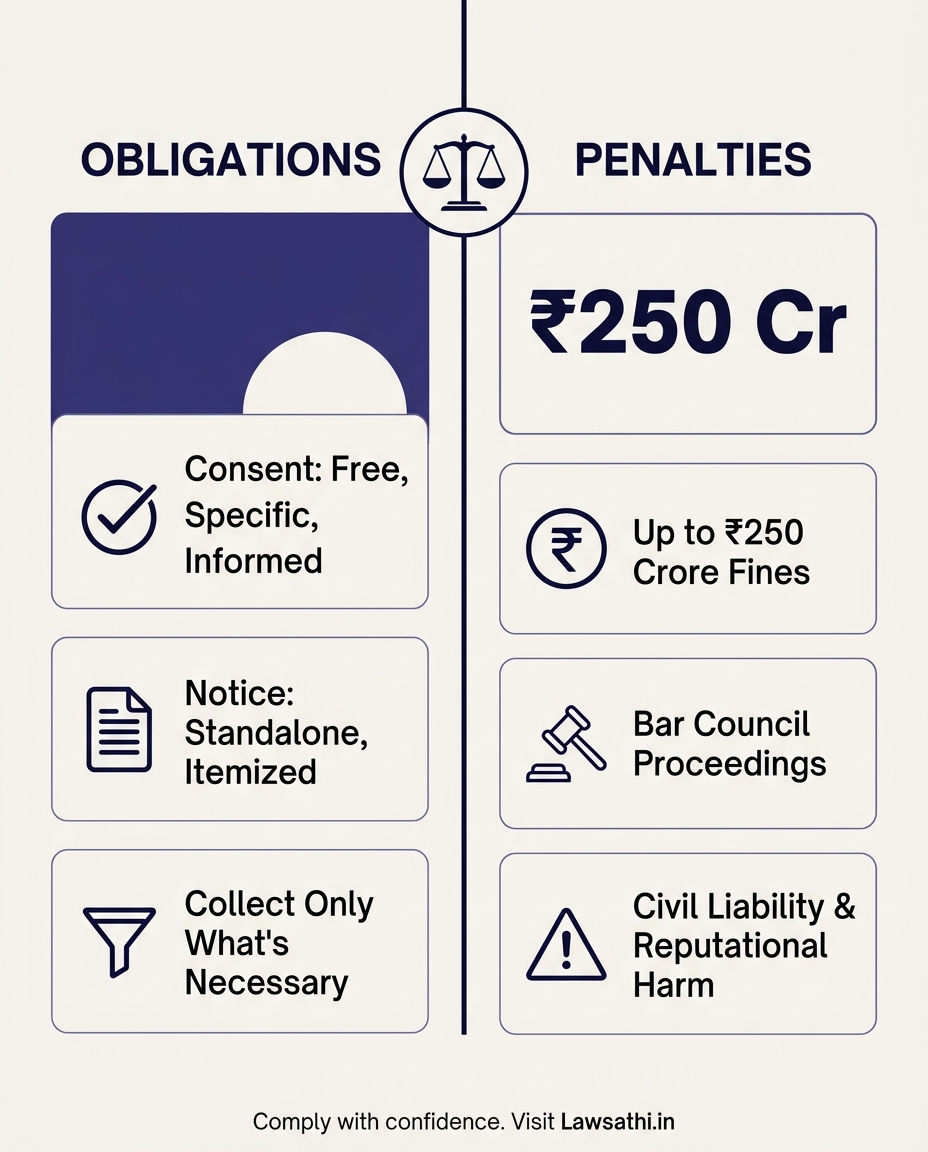
Consent Requirements: You must obtain free, specific, informed, and unambiguous consent before processing personal data. Clients must understand exactly what data you’re collecting and why.
Notice Requirements: A standalone consent notice explaining the purpose of data collection is mandatory. Additionally, this notice must include an itemized list of personal data being collected.
Data Minimization: Collect only what’s necessary for the specified purpose. Process data only for that purpose. Furthermore, seek fresh consent if the purpose changes.
The Cost of Non-Compliance
The penalty structure under the DPDP Act is severe. As noted by legal experts, failure to maintain reasonable security safeguards can attract penalties up to ₹250 crore.
For law firms specifically, non-compliance carries additional risks. These include professional misconduct proceedings before the Bar Council. Moreover, firms face civil liability from affected clients and irreversible reputational damage in the legal community.
—
Step 1: Configuring Role-Based Access Control (RBAC)
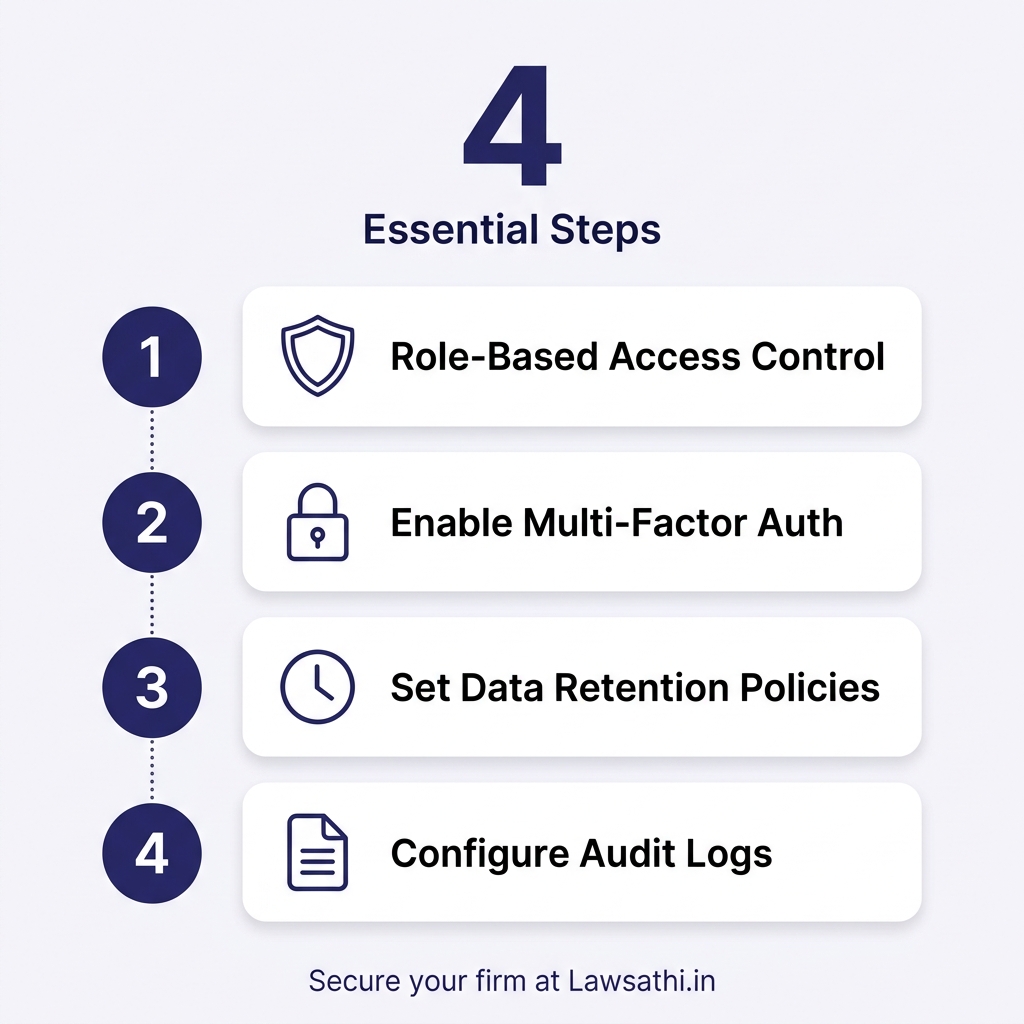
The first critical component of your LawSathi security settings is Role-Based Access Control. This feature directly implements the DPDP Act’s “purpose limitation” principle. Specifically, it ensures team members only access data necessary for their specific duties.
Navigating the User Management Dashboard
To begin, log into your LawSathi admin account and navigate to the “Settings” menu. Select “User Management” from the dropdown options. You’ll see a dashboard displaying all current firm members and their assigned roles.
Next, click on “Add New Role” to create custom permission levels. LawSathi offers pre-configured templates for Managing Partner, Senior Associate, Junior Associate, Intern, and Administrative Staff. However, you can customize these to match your firm’s specific hierarchy.
Setting Granular Permissions
For each role, you can configure permissions across multiple dimensions. These include case file access, client contact details, financial records, and document templates.
Managing Partners should retain full access to all matters for strategic oversight. However, this access must be documented in your audit logs.
Senior Associates typically need access to assigned matters plus matters supervised by them. This balance supports case supervision while limiting unnecessary data exposure.
Junior Associates should access only matters directly assigned to them. This restriction aligns with the purpose limitation requirement under DPDP.
Interns require read-only access to specific assigned matters for training purposes. Never grant them editing or download permissions for sensitive files.
Enforcing Purpose Limitation Through Access Restrictions
The SCC Online analysis of data protection principles establishes an important rule. Data collected for one purpose cannot be repurposed without fresh consent. Your RBAC configuration should reflect this principle.
For example, an associate working on a property dispute shouldn’t automatically access that client’s tax matters. Each case assignment represents a distinct purpose. Therefore, it requires separate access authorization.
Fortunately, LawSathi allows you to set case-level permissions rather than client-level permissions. This granular approach ensures compliance while maintaining operational efficiency.
Step 2: Enforcing Multi-Factor Authentication (MFA)
Passwords alone no longer provide adequate protection for legal data. The DPDP Rules, 2025 explicitly require “reasonable security safeguards” including access controls and encryption. Consequently, Multi-Factor Authentication (MFA) represents the minimum standard for compliance.
Why MFA Is Essential for Legal Software
The Bar & Bench analysis on security requirements highlights a growing threat. Professional service firms face increasing cyberattack risks. Law firms handling sensitive client data are prime targets for malicious actors.
MFA adds a critical second layer of security. Even if passwords are compromised, unauthorized access remains blocked. This protection works without the second authentication factor.
Enabling Mandatory MFA in LawSathi
First, navigate to “Security Settings” within your LawSathi admin dashboard. Select “Authentication Methods” from the menu options. You’ll see toggle switches for various MFA options.
Enable “Mandatory MFA for All Users” to enforce compliance across your firm. This setting cannot be overridden by individual users. As a result, it ensures consistent security standards.
Then, select your preferred MFA method. LawSathi supports authenticator apps (Google Authenticator, Microsoft Authenticator). It also offers biometric authentication (fingerprint, Face ID) and SMS-based OTP as a backup option.
Best Practices for MFA Configuration
Authenticator apps offer the highest security level and work reliably across Indian networks. They don’t depend on cellular connectivity. Therefore, they’re ideal for lawyers traveling to areas with poor network coverage.
Biometric options provide convenience while maintaining strong security. Most Indian smartphones now include fingerprint sensors and Face ID capabilities.
SMS-based OTP should serve only as a backup method. While convenient, it’s more vulnerable to interception than authenticator apps.
Finally, configure a 24-hour grace period for MFA setup. This allows team members to install authenticator apps without immediate lockout. After this period, MFA becomes mandatory for all logins.
—
Step 3: Managing Data Retention and ‘Right to Erasure’
Data retention policies represent one of the most challenging aspects of DPDP compliance for law firms. You must balance client rights to erasure with professional obligations to maintain records.
Understanding the Right to Erasure
The official government notification on DPDP confirms an important right. Data Principals have the right to request erasure of their personal data. Law firms must respond to such requests within 90 days maximum.
However, exceptions exist. Data required for prevention, detection, or investigation of offences need not be erased. Similarly, data necessary for prosecution or pending litigation may be retained.
Configuring Retention Schedules in LawSathi
Access the “Data Management” section in your LawSathi settings panel. Select “Retention Policies” to configure automated archiving rules.
Create separate retention schedules for different case types. Civil matters typically require 7 years of retention after closure. In contrast, criminal matters often need 10 or more years due to potential appeals and post-conviction proceedings.
Client correspondence should be retained for the engagement duration plus 3 years. Financial records require 7 years for tax compliance purposes.
Handling Erasure Requests Through LawSathi
When a client requests data erasure, navigate to their profile in LawSathi. Select the “Data Rights Management” option. You’ll see options for deletion, anonymization, or partial erasure.
Complete deletion removes all personal data permanently. Use this only when no legal obligation requires retention.
Anonymization removes identifying information while preserving case records for statistical or research purposes. This often satisfies client concerns while maintaining your records.
Partial erasure allows selective removal of specific data points. For example, you might remove contact details while retaining case documents needed for professional liability protection.
Most importantly, document every erasure request and your response in the audit log. This documentation demonstrates compliance if questions arise later.
Step 4: Audit Logs and Accountability
The DPDP Act requires Data Fiduciaries to maintain comprehensive audit trails. LawSathi’s activity log features help you meet this obligation. Additionally, they help demonstrate “reasonable security safeguards” to regulators.
Why Audit Logs Matter
The NIC India framework for DPDP readiness emphasizes accountability as a core compliance pillar. Audit logs provide the evidence needed to demonstrate that accountability.
Security logs must be retained for a minimum of one year under the DPDP Rules. Additionally, you must actively monitor and review access patterns. This helps identify potential security issues.
Generating Compliance Reports from LawSathi
Navigate to the “Reports” section in your LawSathi dashboard. Select “Audit Logs” to access the comprehensive activity tracking system.
You can filter logs by user, action type, date range, and case reference. This granularity allows targeted reviews when investigating specific incidents. It also helps when preparing for compliance audits.
Generate monthly compliance reports summarizing access patterns, failed login attempts, and permission changes. These reports serve as evidence of active monitoring during regulatory inquiries.
Demonstrating Reasonable Security Safeguards
The Bar & Bench guide to DPDP compliance notes an important requirement. Security safeguards must be documented and demonstrable. Your LawSathi audit logs provide this documentation.
Export detailed logs showing:
– User authentication events (logins, MFA challenges, failed attempts) – Data access records (who accessed what information and when) – Modification history (changes to client files, settings, or permissions) – Erasure requests and responses with timestamps
Store these exports separately from your LawSathi account. This ensures evidence availability even if your primary account is compromised.
—
Client Communication: Managing Consent via the Client Portal
Client-facing features of LawSathi security settings ensure transparent consent management. These tools help you meet notice requirements. Furthermore, they help build client trust.
Configuring Consent Notices in the Client Portal
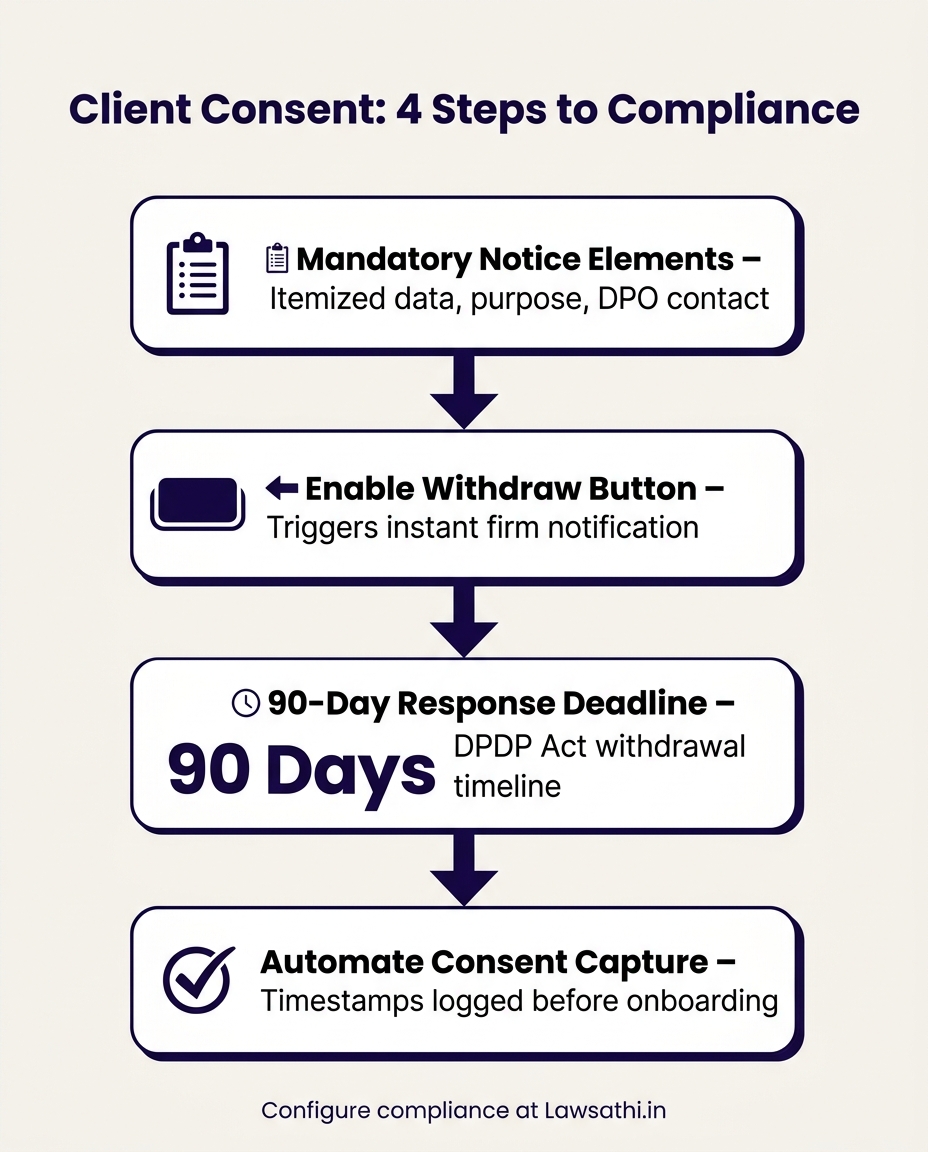
Access “Client Portal Settings” from your LawSathi admin dashboard. Select “Consent Management” to configure the consent display system.
Upload your consent notice template in the designated field. LawSathi requires this notice to be displayed independently before clients can access any portal features. This independence is mandated by the DPDP Rules’ consent requirements.
Include the following mandatory elements in your notice:
– Itemized list of personal data being collected – Specific purpose for data collection – Description of services enabled by data processing – Links for clients to exercise their DPDP rights – Contact information for your Data Protection Officer
Enabling Consent Withdrawal Mechanisms
The LiveLaw analysis on consent foundations confirms an essential right. Clients must be able to withdraw consent at any time. Your LawSathi Client Portal must facilitate this right.
Enable the “Withdraw Consent” button in the Client Portal settings. This button should be prominently displayed and easily accessible. When clicked, it should trigger an immediate notification to your firm.
Configure the response workflow for consent withdrawals. Designate a team member to handle these requests within the 90-day response timeline mandated by the DPDP Act.
Automating Notice Generation for New Clients
LawSathi allows you to automate consent capture during client onboarding. Enable the “Consent Before Onboarding” feature in your settings.
When a new client attempts to register, they’ll see your consent notice first. Only after providing affirmative consent can they proceed to create their account. This automated process ensures no client is onboarded without proper documentation.
The system automatically logs consent timestamps and records the specific consent version agreed to. This evidence trail protects your firm in case of future disputes.
Conclusion: Building Trust Through Compliance
Configuring your LawSathi security settings for DPDP compliance isn’t just about avoiding penalties. Instead, it’s about demonstrating professional excellence in an era where data privacy defines client trust.
Key Configurations Summary
You’ve now learned to implement four critical security components. Role-Based Access Control ensures purpose limitation by restricting data access. Multi-Factor Authentication provides essential safeguards against unauthorized access. Data retention policies balance client rights with professional obligations. Finally, audit logs document your compliance journey with irrefutable evidence.
The Competitive Advantage of Compliance
Law firms that embrace data privacy gain significant advantages in the marketplace. Clients increasingly evaluate lawyers on their ability to protect sensitive information. Your visible commitment to compliance through properly configured security settings signals professional competence.
As noted by legal industry observers, technology adoption separates forward-thinking firms from those struggling to adapt. DPDP compliance represents an opportunity to lead rather than follow.
Your DPDP Readiness Checklist
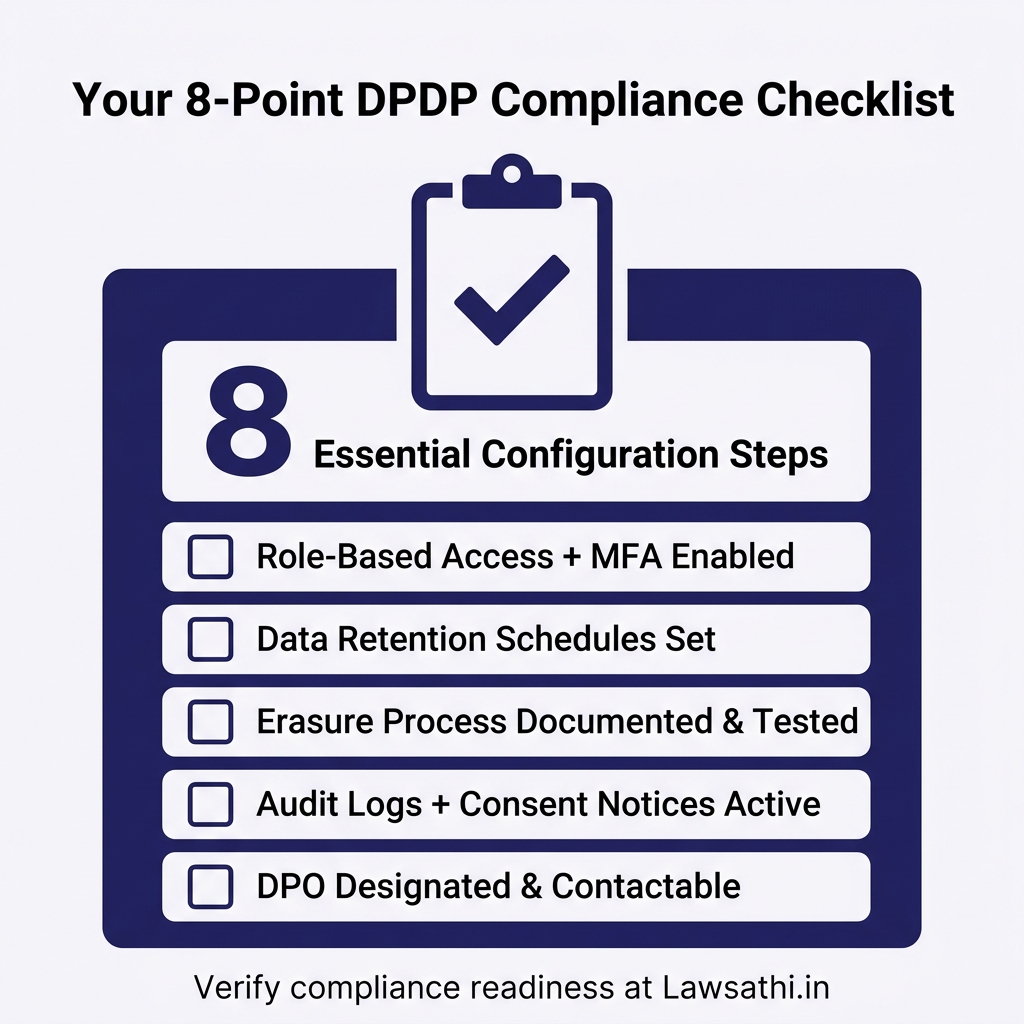
Before concluding, verify you’ve completed these essential steps:
– ☐ Role-Based Access Control configured for all team members
– ☐ Mandatory MFA enabled for all users
– ☐ Data retention schedules established by case type
– ☐ Erasure request process documented and tested
– ☐ Audit logs configured with one-year retention
– ☐ Client Portal consent notices displaying correctly
– ☐ Consent withdrawal mechanism active and accessible
– ☐ Data Protection Officer designated and contactable
Secure your practice today. Start your free 14-day trial of LawSathi and activate enterprise-grade security settings for DPDP compliance.